Ruwad Connect: The Time Tracker That Follows the Hour All the Way to the Payslip
Ruwad Connect, a SaaS time tracker from AVMDEVS, records work once and turns approved hours into payroll and client invoices. Here is why that matters for productivity, and what it costs.
Thursday, November 26, 2026/4 min read
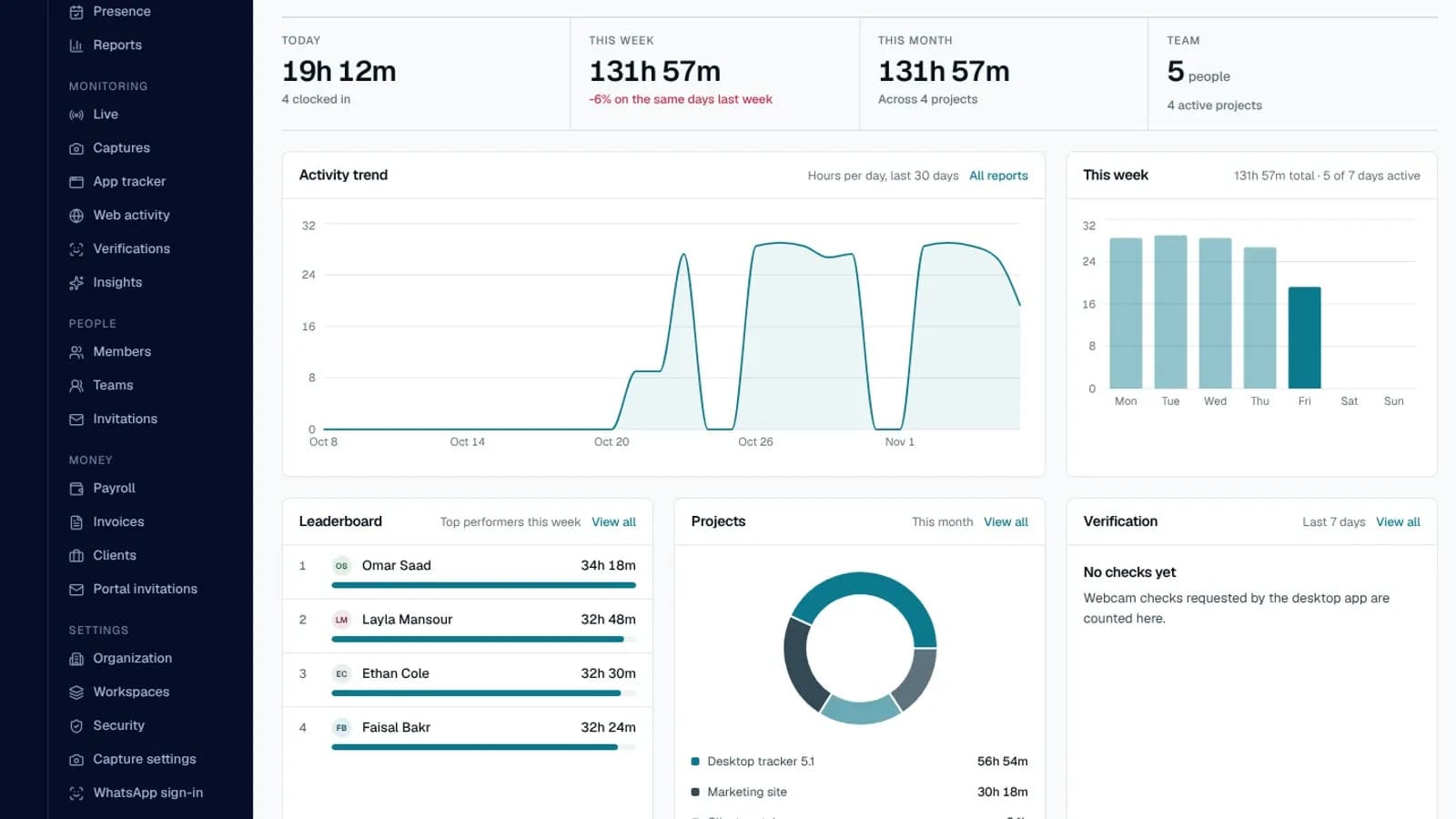
Ruwad Connect is a SaaS time tracker from AVMDEVS LLC for teams that pay people and bill clients by the hour. A desktop app records the work, a manager approves it, and the same approved hours become payroll and client invoices. Its case for productivity is simple: an hour should be entered once and never typed again.
Where the working week actually leaks
Most teams do not lose their week to laziness. They lose it to the work around the work.
Somebody rebuilds a timesheet from memory on Friday afternoon. A manager chases three people for missing entries. Finance copies hours from one spreadsheet into another, then into an invoice, and a client disputes a line nobody can back up. None of this is the job anyone was hired to do, and all of it repeats every pay period.
A time tracker only helps productivity if it removes that layer. One that adds a second place to fill in hours makes the problem worse.
One record, three uses
Ruwad Connect is two things, in its own words: "a desktop app for Windows and macOS that records work while someone is punched in, and a web workspace where projects, approvals, payroll and invoices live." The features page sets out a chain that runs in one direction:
- Track. A team member picks a project and a task and punches in from the desktop, the tray or the menu bar. Breaks are recorded as breaks. If nobody touches the keyboard or mouse for a while, the app asks what happened instead of guessing.
- Approve. A manager approves or rejects each entry, or approves a selection in bulk.
- Pay and bill. Payroll takes a member's approved hours times their rate, with overtime, and produces a payslip PDF. Invoices are built for a client and project from approved billable hours at the project's rate, and a receipt follows once the invoice is marked paid.
The same hours on three screens


The productivity gain is in what never happens: no re-keying between timesheet, payroll and invoice, and no argument about which version of the hours is the real one.
Planning and doing in the same place
Hours mean little without the work they belong to. The web workspace carries the project side too: board, list, backlog, sprints, calendar, Gantt, timeline and milestones. Each task shows its own actual hours, and projects carry members, a billing rate and a budget.
That closes a loop most teams leave open. An estimate sits next to the hours really spent, so the next estimate is better. Reports filter time by member or by project for any period, and exports come out as CSV, XLSX or JSON, with ready-made CSV layouts for ClickUp and Zoho Projects.
Visibility without the status meeting
For remote and hybrid teams, the daily question is "who is on what right now?" Ruwad Connect answers it with a live page showing everyone who is tracking at this moment, with their project, task and elapsed time.
Screenshots are taken from every monitor at the plan's cadence while someone is punched in, with blur available, and laid on an hourly activity chart. On paid plans, each capture gets an AI description and the day gets an AI summary, so a manager reads a short account of the day instead of scrolling through images.
Does Ruwad Connect record keystrokes?
No. Screenshot tools can damage the trust that productive teams run on, and Ruwad Connect is unusually plain about its limits:
- Each person sees a consent screen before the first capture.
- Nothing is recorded while someone is stopped or on a break.
- Keystrokes are not recorded.
- Webcam checks exist only where enabled and consented to.
- Clients receive invoices and receipts by email and never see screenshots.
Data is stored on servers at Hetzner in Germany, according to the privacy policy, and screenshot links expire within 15 minutes. The policy also names its sub-processors, including OpenAI for AI screenshot analysis on plans that include it.
How much does Ruwad Connect cost?
The product is built for three kinds of team: agencies that bill by the hour, remote and hybrid teams, and companies running several entities, which can hold several workspaces under one sign-in. Prices are per user, in US dollars:
- Free: $0, no card needed. Up to 10 people, 3 projects, 1 screenshot an hour and 30 days of data.
- Starter: $7 a user per month, or $60 a user per year. 12 screenshots an hour, AI analysis and 365 days of data.
- Professional: $12 a user per month, or $96 a user per year. 30 screenshots an hour and unlimited retention.
- Enterprise: priced on request, for 50 or more users.
Starter and Professional come with a 14-day trial at checkout.
What it does not do yet
There is no mobile app and no Linux tracker. The Mac build is not yet notarized by Apple. Teams that need those should check the download page before committing.
The company behind it
Ruwad Connect is a product of AVMDEVS LLC, a US company registered in Colorado with teams in Beirut, Dubai and Jeddah. AVMDEVS builds software for clients across the US, the GCC and MENA and has worked with clients since 2011.
The free plan covers ten people and three projects, which is enough to run one real pay period through it and see whether the hours arrive at payroll untouched.
Disclosure: Outspoken Digest is operated by AVMDEVS LLC, the maker of Ruwad Connect. Every figure here was read from ruwadconnect.com on 26 November 2026.
Published in The Outspoken Digest
Editorial desk
Outspoken Digest Brand StudioReports for The Outspoken Digest across Business, Lifestyle, Technology.
Newsletter
The Digest, in your inbox
One edition, sent when it is ready. No noise, and your address is never passed on.
Read Next
More Business →
A Handshake, a Frame and a Rebar Cutter: Al Wisam at Big 5 Global 2026
Nov 25, 2026/6 min read

Gold Slides to $3,552 and Silver Drops 5% to $40.79 as Oil Climbs Ahead of Wednesday's PCE Inflation Test
Nov 25, 2026/2 min read

Kospi Plunges 6.2% and Nikkei Falls 2.8% as the AI Sell-Off Hits Asia Again, While Europe Opens Firmer
Nov 25, 2026/2 min read
Anthropic Closes at $81.91, Below Its $83 IPO Price, After Touching $75.61 as Index Funds Loom
Nov 25, 2026/2 min read